
Google Tag Manager is usually where clean engineering architecture goes to die.
A developer spends weeks crafting type-safe frontend components, deterministic state machines, and strict API schemas. Then marketing injects arbitrary custom HTML snippets, five competing analytics scripts fire on the same button click, and nobody notices that Consent Mode v2 was never configured until the compliance audit fails.
The problem is not that tag managers are poorly designed. It is that they live in a separate web UI completely detached from the codebase, version control, and developer review workflows.
By exposing the Tag Manager API over the Model Context Protocol (MCP) and
pairing it with an interactive /setup command, we can bring container
audits, tag deduplication, and schema validation directly into the developer's
terminal.
The silent failure modes of tag drift
When an organization relies on manual GTM configuration, three defects emerge repeatedly across production sites.
1. Duplicate measurement initializations
A common anti-pattern in mature containers is multiple base tags firing on the same page. A developer adds a GA4 configuration tag during site launch; six months later, a marketing agency adds a second GA4 tag to track a campaign; a third tag gets imported from an agency recipe.
Because GTM evaluates all matching triggers independently, both tags execute on
Initialization - All Pages. Every pageview, session duration, and bounce rate
is recorded twice in the analytics property — silently corrupting years of
historical reporting.
The same defect occurs with Meta Pixel and TikTok base scripts, where duplicate
fbq('init') calls inflate top-of-funnel conversion counts.
2. Unconsented marketing tracking
Under European privacy frameworks and Google Consent Mode v2, advertising tags
must not execute or transmit identifiers without explicit ad_storage,
ad_user_data, and ad_personalization grants.
In a raw container, Custom HTML tags have no built-in consent gating. Unless an engineer manually opens every tag and checks "Require additional consent for tag to fire", marketing pixels will fire on first page load before the consent banner is even rendered.
Auditing this by clicking through seventy tags in the GTM web interface is tedious and error-prone.
3. State bleeding across dataLayer events
When tracking e-commerce funnels (view_item, add_to_cart, purchase), GTM
variables read directly from the global window.dataLayer array.
If a developer pushes a view_item event with five items, and subsequently
pushes an add_to_cart event with one item without clearing the parent
ecommerce object, GTM merges the keys. The second event inherits leftover
attributes from the first, sending corrupted item lists to downstream ad
networks.
Turning container governance into an MCP toolset
To solve these issues without forcing engineers into the GTM web interface, we
packaged container diagnostics and remediation into an MCP server:
gtm-tag-architect.
The server exposes dedicated tools over standard input/output:
// src/server.ts - Exposing GTM governance tools via MCP
server.setRequestHandler(ListToolsRequestSchema, async () => {
  return {
    tools: [
      {
        name: "gtm_audit_container",
        description: "Diagnoses duplicate tags, orphaned triggers, and Consent Mode v2 violations.",
      },
      {
        name: "gtm_deduplicate_tags",
        description: "Consolidates redundant GA4/Meta tags and merges firing triggers.",
      },
      {
        name: "gtm_apply_consent_mode",
        description: "Enforces Google Consent Mode v2 checks across all marketing pixels.",
      },
      {
        name: "gtm_generate_datalayer_types",
        description: "Generates typed TypeScript event contracts for the frontend.",
      },
    ],
  };
});
Diagnostic container inspection
When an agent runs gtm_audit_container (either against the live Google API or
an exported JSON container), the audit engine walks the tag graph and computes a
container health score:
export function auditContainer(container: GtmContainerExport): AuditReport {
  const tags = container.containerVersion.tag || [];
  const findings: AuditFinding[] = [];

  // Check duplicate GA4 configurations
  for (const tag of tags) {
    if (tag.type === "googtag" || tag.type === "gaawc") {
      const id = tag.parameter?.find(p => p.key === "tagId")?.value;
      if (seenGA4.has(id)) {
        findings.push({
          id: "DUP-GA4-01",
          severity: "critical",
          title: `Duplicate GA4 Configuration (${id})`,
          affectedEntities: [tag.name, seenGA4.get(id).name],
          recommendation: "Consolidate into a single base tag.",
        });
      }
    }
  }

  return { healthScore: calculateScore(findings), findings };
}
The /setup interview runbook
Rather than expecting developers to remember tag parameters, the plugin bundles
a /setup skill.
When invoked, the agent conducts a short discovery interview:
- Industry & Business Model: E-commerce, SaaS/PLG, or B2B lead generation.
- Platform & Framework: Next.js App Router, Shopify, or WordPress.
- Required Ad Pixels: GA4, Meta CAPI, Google Ads, LinkedIn Insight.
- Privacy Thresholds: GDPR default
deniedvs global standard.
Once the interview completes, the agent runs the diagnostic audit, presents an actionable menu of detected defects, and executes the remediation tools in one pass.
Typed contracts on the frontend
To prevent runtime dataLayer corruption, the plugin generates a TypeScript
definition module (dataLayer.d.ts) customized to the chosen industry taxonomy:
// Generated dataLayer event contract for Lead Generation
export interface PortfolioTrackingEvents {
  contact_form_submitted: {
    form_id: string;
    success: boolean;
  };
  outbound_link_clicked: {
    destination_url: string;
    link_category: "github" | "linkedin" | "certification";
  };
}

export function trackEvent<T extends GtmEventPayload>(payload: T): void {
  if (typeof window !== "undefined" && window.dataLayer) {
    window.dataLayer.push(payload);
  }
}
The frontend codebase and the GTM container are now bound to the same typed schema.
Real-world verification on production (jarniel.dev)
When this site was first deployed, the GTM container (GTM-TZPWP67V) had only
a basic Google Tag firing on page_view. Every other user interaction — which
sections readers inspect, when someone verifies an Anthropic credential, or how
deeply a post gets read — was completely invisible to analytics.
Instead of manually clicking through the GTM interface to create ten tags and
triggers by hand, we ran gtm-tag-architect directly against the codebase and
container via MCP. Within minutes, the agent identified the taxonomy coverage
gap, generated an optimized container payload, and produced the typed frontend
contracts.
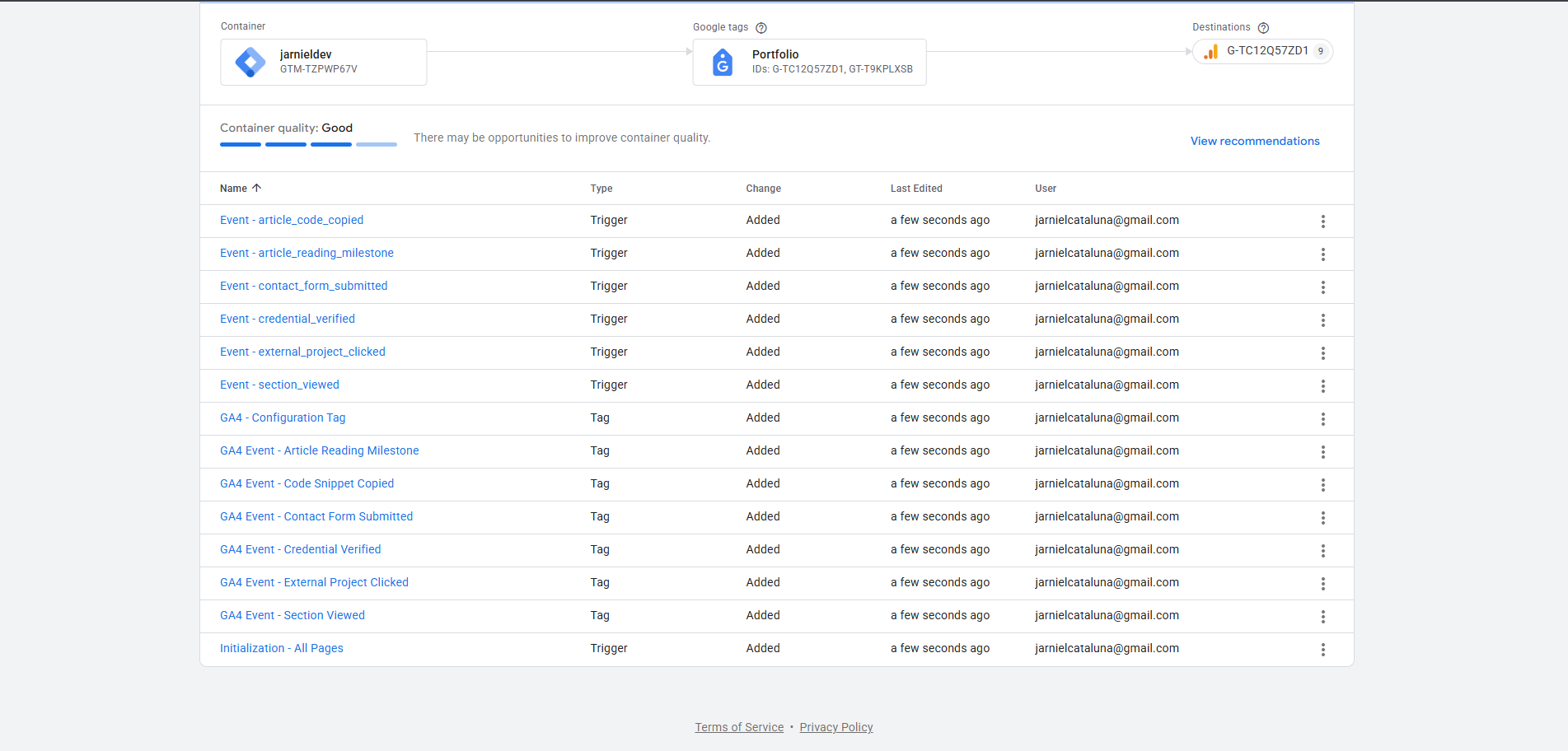
1. Workspace imported in Google Tag Manager
Importing the generated container JSON into GTM deployed the full suite of
recommended portfolio trackers (section_viewed, credential_verified,
external_project_clicked, article_reading_milestone, article_code_copied)
and their corresponding custom event triggers in a single operation:
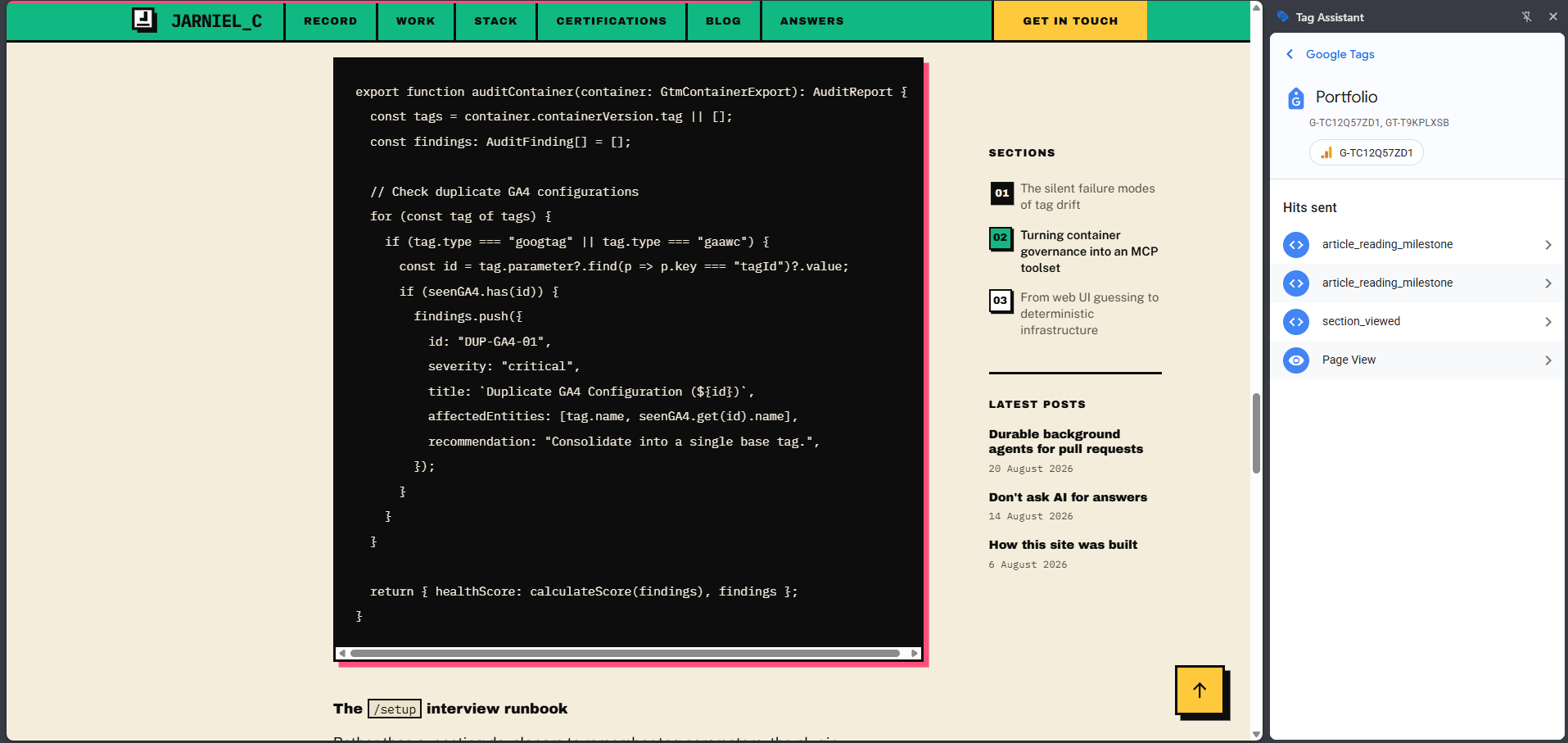
2. Live telemetry in Google Tag Assistant
Testing the live production site with Google Tag Assistant attached confirms
that the client-side AnalyticsTracker emits typed interaction events, and
GTM receives every hit in real time:
From web UI guessing to deterministic infrastructure
Tag management does not need to remain an opaque black box managed by whoever has admin access to a third-party portal.
When we treat tag containers as structured data artifacts — audited through MCP tools, configured through interactive agent runbooks, and backed by strict TypeScript contracts in the repository — tracking becomes as reliable and maintainable as the rest of the application stack.
The complete plugin and MCP server implementation is open-source at jarnielcataluna/gtm-tag-architect.